

A redesigned website can look better and still lose the pages that bring people to your business. Before approving the launch, ask for a page-by-page plan: which URLs remain, which move, what replaces them, and how the new site will be tested. That is the practical core of a website redesign SEO checklist.
This guide is for owners of existing business websites, especially lead-generation sites. You do not need to configure the redirects yourself. You do need enough evidence to sign off on the content, search access, and enquiry path your business depends on. No checklist can guarantee unchanged rankings after a redesign, but it can make avoidable launch errors visible.
The owner’s five checks
- Save a list of current pages that earn visits, enquiries, or useful links.
- Record a keep, move, consolidate, or retire decision for each important URL.
- Compare the new page with the old page’s purpose, not just its appearance.
- Test moved URLs, search access, navigation, and forms before launch.
- Set a named owner for postlaunch checks in Search Console and analytics.
01 Start with a page inventory, not a new sitemap sketch
A navigation mockup shows where the new site might go. It does not show what the current site would lose. Export the existing URL list from your CMS or sitemap, then add pages receiving search visits, enquiries, or links from other sites. Include service pages, case studies, guides, and useful downloadable files. Google's site move guidance recommends using sitemaps, analytics or server logs, and link data to identify important old URLs.
For each page, write down its job. A page about one service may need to stay distinct even if a cleaner design tempts you to fold every service into one page. A thin, outdated page may be better improved, consolidated into a genuinely related page, or retired. Make that an editorial decision rather than an accidental result of the new template.
02 Give every important URL a destination decision
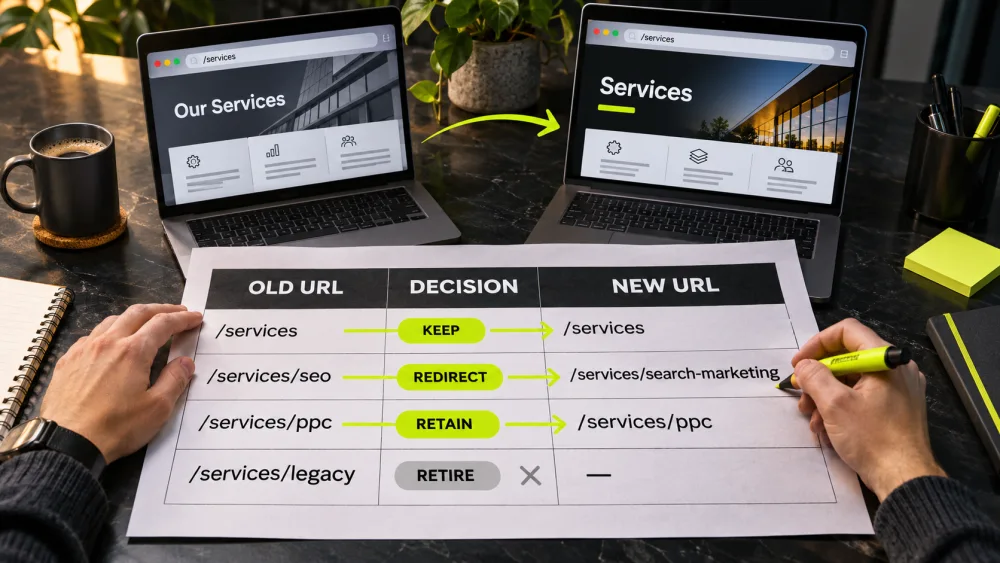
Use a simple sheet with columns for old URL, current page purpose, decision, new URL, and test result. If a useful page can keep its address, keep it. If /services/seo becomes /services/search-marketing and the new page serves the same need, map the old address to that relevant replacement. If several old pages are genuinely combined into one stronger page, document that consolidation. If there is no relevant successor, a real 404 or 410 can be clearer than sending everyone to the homepage.
Google recommends permanent redirects for lasting moves and warns against redirecting many unrelated old URLs to one irrelevant destination. Ask your developer to test the actual response and final page for each moved URL. A spreadsheet row alone is not proof that the redirect works.
03 Compare page purpose before approving the new copy
A redesign often changes copy, hierarchy, and navigation at the same time. Review important pages side by side. Does the new service page still explain who the service is for, what is included, where it is offered, and what the visitor should do next? Are the proof points, contact details, and useful answers still present? A more spacious layout is valuable only if the page continues to answer the reader's question.
Check the page title, main heading, description, image text alternatives, and links to related pages. Those elements should describe the actual new content. Do not preserve weak copy merely because it is old, but document major content changes so a later traffic change can be investigated. If the project budget is still being scoped, the website design cost guide explains why content migration and launch work should be compared explicitly in proposals.
04 Test the site as a visitor and as a crawler

Choose a few real paths: a search visitor arriving on a service page, a reader moving from an article to a service, and a prospective client sending an enquiry from a phone. Follow each path on the staging site. Check that navigation, internal links, images, mobile layout, and forms work with realistic content. Submit a test enquiry and confirm it reaches the intended destination.
Then ask the developer to show the technical checks. Important new pages should be reachable, return the intended HTTP response, and have appropriate canonical URLs. New internal links and the sitemap should use the final addresses. If staging used noindex or a robots rule to keep it out of search, confirm the launch configuration removes those blocks from public pages. Google's site move documentation specifically calls out URL maps, updated internal links, sitemaps, and temporary crawl blocks.
Review performance on real page templates as well. A fast blank template says little about a service page with its final hero image, scripts, and form. The real-user speed guide explains why lab and field results can disagree after launch.
05 Put a short monitoring plan beside the launch plan
On release day, revisit the highest-value old URLs and confirm they land on the intended new pages. Check a sample of retained pages, the live sitemap, important forms, and Search Console verification. If the redesign also changes the domain, the site move has additional steps; the same-domain checklist alone is insufficient.
During the following weeks, compare page-level search impressions and clicks with the prelaunch baseline, review indexing and crawl errors, and inspect enquiry volume. A dip is a signal to investigate, not automatic proof that one design change caused it. Google's guidance says discovery and processing happen page by page, so monitor the old and new URLs rather than expecting an instant handover.
06 Mistakes that delay a clean launch
- Changing page addresses because the new menu labels changed, without checking whether the old URLs could remain.
- Sending every retired page to the homepage, even when it has no relevant replacement.
- Approving placeholder copy, missing images, or generic metadata because the template looks polished.
- Testing redirects in a spreadsheet but not requesting the old URLs in a browser or HTTP check.
- Leaving staging
noindexrules on public pages. - Launching a lead-generation site without sending a real test enquiry.
- Checking rankings only, without reviewing affected URLs, indexing, and business enquiries.
07 Website redesign SEO FAQs
Can I redesign the site without changing any URLs?
Often, yes. The URL does not have to change just because the visual design or CMS changes. Still test each important page, its content, and its search accessibility after the rebuild.
Do old pages always need a redirect?
No. A page that remains at the same URL needs no move redirect. A page moved permanently should point to a relevant new destination. A genuinely removed page with no useful replacement can return 404 or 410.
How soon should I expect search traffic to settle?
There is no fixed timeline. Google processes site moves page by page, and crawl frequency varies. Keep monitoring Search Console, affected URLs, and enquiries while the new site is discovered.
Who should own the launch checklist?
Give one person responsibility for the URL map and release sign-off, with named help from whoever owns content, development, analytics, and enquiries. The owner should be able to see test results, not just a statement that SEO was considered.
Planning a redesign of an existing business website? Tijo Creative can help review page structure, content, mobile experience, and the launch path as part of a website design project. Bring your current URL list and the pages that generate enquiries, then contact Tijo Creative to discuss the redesign.
FAQ
Common questions about Website Redesign SEO: What to Check Before Launch
A quick summary of the most common questions readers have about this topic.
Yes. A redesign can change page URLs, content, internal links, metadata, or whether pages are crawlable. Keeping the domain does not prevent those changes.
No redirect is needed for a page that remains at the same public URL. Test that it still loads, serves the intended content, and remains available for indexing.
No. Redirect a moved or consolidated page to a relevant replacement. If no useful replacement exists, a genuine 404 or 410 response may be appropriate.
No. A relevant permanent redirect helps users and search engines find a moved page, but rankings can change as Google processes the move and evaluates the new page.